Works at the end of the world
Maps, routes, search and radio run on the computer in your vehicle. No signal on the pass? No roaming in Norway? Doesn’t matter.
Smart RV Solutions
Navigation that knows how tall your camper is. Radio without internet. SIM cards that switch by themselves at the border. All in Home Assistant – and all running offline in your vehicle.
Maps, routes, search and radio run on the computer in your vehicle. No signal on the pass? No roaming in Norway? Doesn’t matter.
Height, width, length, weight: Yapaia Go won’t send your 3.20 m camper under a 3 m bridge.
Every module shows up in Home Assistant as a device with sensors, switches and triggers. Tap instead of coding.
Source on GitHub, documented interfaces, maps from OpenStreetMap. Look inside, build along, extend it.
Take what you need. Every module works on its own – together they do more.
Yapaia Go
Offline navigation for motorhomes – with your real dimensions, on your own computer, no signal and no account required.
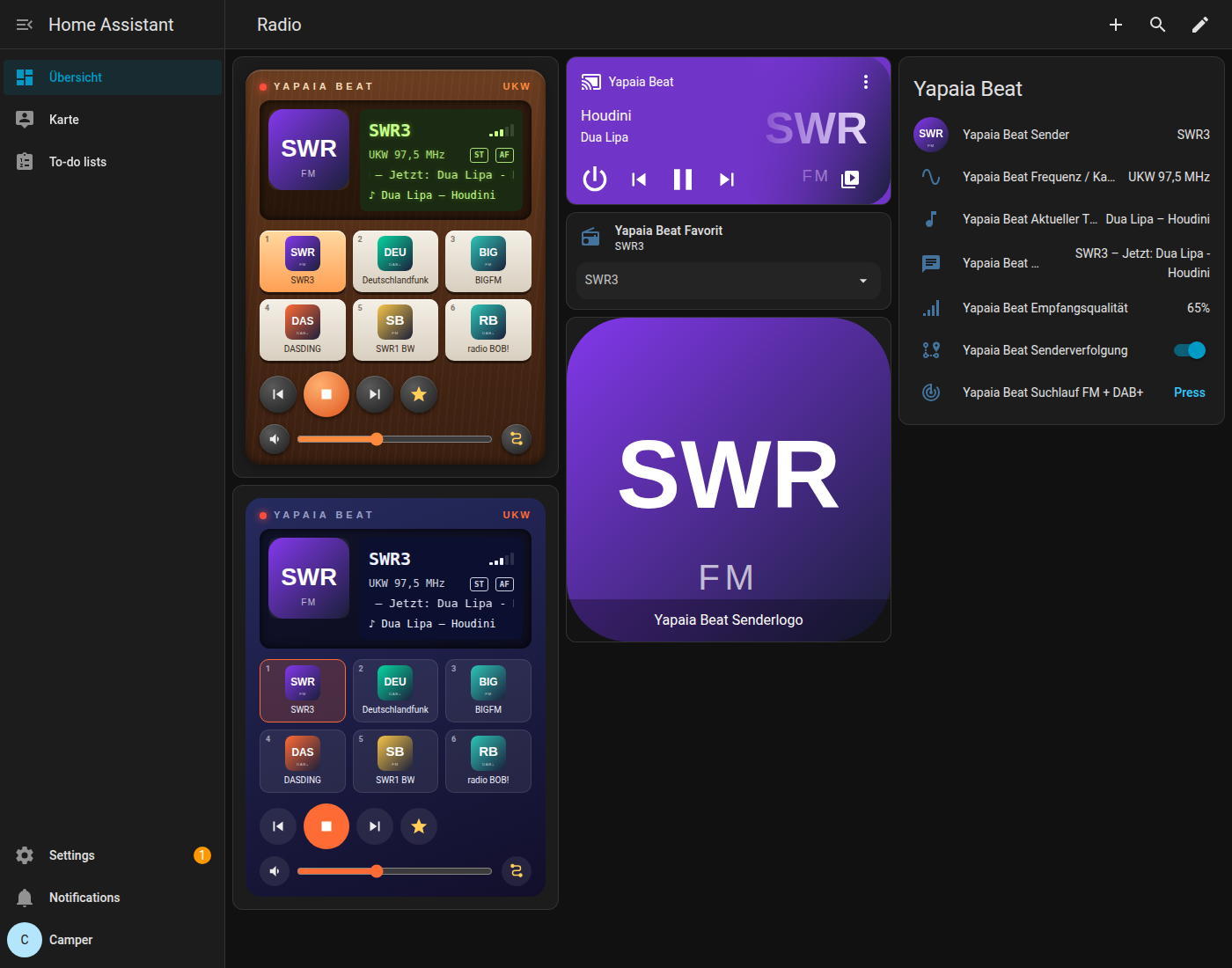
Yapaia Beat
FM and DAB+ with a small USB stick – no internet needed, with station logos, favourites and automatic station following.
Yapaia Router
Your GL.iNet router’s mobile connection in Home Assistant – with signal, roaming indicator and automatic SIM switching when you cross a border.
Yapaia Satellite
A small voice speaker for your motorhome – on an inexpensive ESP32 board, set up entirely through Home Assistant.
Yapaia Vision
Analogue cameras such as your reversing camera in Home Assistant, via an inexpensive USB video grabber – local, no cloud.
Yapaia in Home Assistant
The “Yapaia” integration brings every module into Home Assistant as a device – with sensors, switches, actions and triggers, no YAML required.
A small mini-PC running Home Assistant – many campers already have one on board.
Enter one address in the add-on store, tap the modules, install. No terminal, no code.
Load a map, enter your vehicle, done. Yapaia takes care of the rest on the way.
Because every module meets in Home Assistant, “I still need to …” becomes “already done”.
30 minutes to the campsite
Water heater and heating switch on – you arrive to a warm home.
Crossing into Austria
The router switches to your Austrian SIM by itself.
Too fast for 7.5 tonnes
A gentle announcement blends into the radio.
Arrived
Lights on, radio down, a reminder about the levelling jacks.
For makers and tinkerers
Always tinkering with your vehicle until it is exactly the way you want it? You’ll feel at home here.
alias: "Arrive warm"
triggers:
  - trigger: numeric_state
    entity_id: sensor.yapaia_go_restweg
    below: 30   # km
actions:
  - action: switch.turn_on
    target:
      entity_id: switch.boiler
Map server
Building all of Germany on a mini-PC takes hours. With the Yapaia map server, Go downloads finished packages – map, address search and routing in one – and verifies every byte before swapping them in.
How it worksNo. You only need internet to install and to update maps. Navigation, search and radio run completely offline.
A computer running Home Assistant OS – an N100 mini-PC with 8 GB RAM is ideal. Plus a USB GPS receiver and, for radio, an RTL-SDR stick.
No. Everything works through the Home Assistant interface. If you want to, you can still dive deep.
No. Each module works on its own. Together they do more – like navigation announcements blending into the radio.
No. No subscription, no account, no cloud. Your data stays in your vehicle.