Yapaia Go Beta
Navigation that knows how big your camper is.
Offline navigation for motorhomes – with your real dimensions, on your own computer, no signal and no account required.
- Routes by height, width, length and weight
- Maps, search and routing fully offline
- Voice guidance, rerouting, speed limit warnings
- Destination by voice or from Home Assistant
Why another navigation app?
Phone navigation stops where the signal stops – usually right at the mountain pass. Truck sat-navs know your weight, but they cost a lot and age badly. Yapaia Go is the third way: the routing technology logistics companies use, fed with the real dimensions of your vehicle, on a computer you probably already have on board.
What Go does for you
| Routes for your size | A 3.20 m tall camper is not sent under a 3 m bridge. Height, width, length and weight go into every route. |
| Truly offline | Not “works offline once cached”. Map, routing and address search live on your disk. There is no online mode to fall back to. |
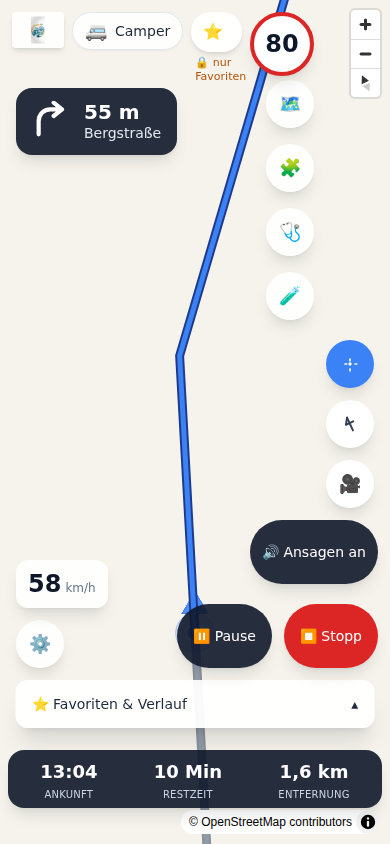
| Turn-by-turn guidance | Spoken instructions, automatic rerouting, arrival time, speed limit and a warning when you are too fast. |
| Any position source | A USB GPS receiver, your browser’s GPS, or the Home Assistant app on your phone. |
| Made for driving | Large buttons, controls for left- and right-hand drive, settings lock above 10 km/h. The screen stays awake. |
| Lanes and points of interest | Before turns and exits, Go shows which lane to take. “Find along the way” (“Unterwegs finden”) finds fuel, a motorhome site or a dump station ahead on your route – one tap and it becomes your next stop. |
| Connected to Home Assistant | Arrival, distance remaining, next instruction and location become entities – and “destination reached” a trigger for your automations. |
Simply in the browser
Go runs on the mini-PC and opens in any browser: the tablet on the dashboard, your phone, the iPad on the passenger seat. No app, no store, no forced updates.
Online, if you want
Go does not need the internet. If you do have a connection, you can switch on the online services in the add-on configuration (off by default):
- Traffic: roadworks, closures, traffic jams and accidents from Germany’s motorway operator (Autobahn GmbH) on and next to your route. Jams colour the route and are included in your arrival time. Covers German motorways only.
- Fuel prices: current prices at German petrol stations via Tankerkönig, matching your vehicle’s fuel type. You need a free key of your own.
- More about a place: opening hours, facilities, a Wikipedia excerpt and photos for a place you tap, plus a map style with satellite imagery.
If the connection drops, only these extras go away. Navigation does not notice.
Extensible with add-ons
Go can be extended with add-ons that run isolated in a sandbox. From the Yapaia marketplace, Go only installs packages the marketplace has signed; paid add-ons are possible there too. If you write an add-on yourself, you use the SDK – it is under the Apache licence, so you can license your add-on however you like.
Maps, ready-baked
You can build maps directly in Go – or load finished packages from the Yapaia map server: map, address search and routing in one go, verified by checksum. The manual explains how under Maps and map server.
To be honest
- Go is not a phone app. It runs on a computer in your vehicle and is used in the browser.
- Live traffic is only available with the online services switched on, and only for German motorways. Without a connection there is no traffic information.
- Maps are as good as OpenStreetMap. Height and weight limits are well mapped on main roads and patchy on small ones. Go tells you about this.
- Everything Go shows – route, clearance height, speed limit, lanes – is guidance. The person at the wheel remains responsible.